
Content Creator
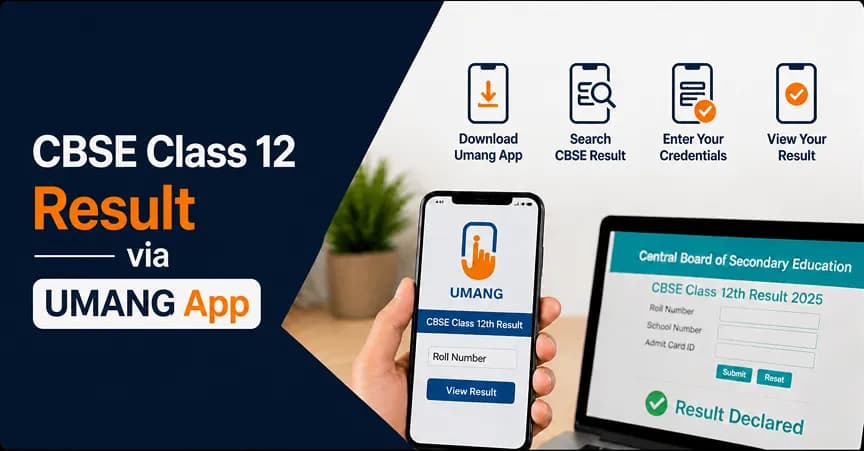
UMANG app is one of the easiest ways to check the CBSE Class 12 Result 2026. Since the CBSE 12th Result 2026 is now out, students can use the app to view and download their marksheets quickly without facing website traffic or slow loading problems.
Many students check their results at the same time on the official websites, which can sometimes make the sites slow. In such situations, the UMANG app becomes a useful option. Students simply need to log in to the app on their mobile phone and access their CBSE Class 12 result easily.
UMANG is Unified Mobile Application for New-age Governance. It is an official mobile application launched by Government of India as part of the Digital India initiative. The main objective of this app is to provide multiple government services at one place so that the user does not have to go to different websites or offices. With UMANG app, students can avail services from over 1,300 government departments such as CBSE, EPFO, Aadhaar, PAN and many more. It is available on Android and iOS devices. So it is easily accessible to most students. The UMANG app can be very helpful for checking the CBSE Class 12 Result 2026. The official website of CBSE may face technical glitches like being unable to cope with high traffic on the result date. In such situations, UMANG proves to be very efficient, making all the processes run smoothly.
| Feature | Details |
|---|---|
| Full Form | Unified Mobile Application for New-age Governance |
| Launched By | Government of India |
| Initiative | Digital India |
| Services Covered | 1,300+ government services |
| Key Services | CBSE, EPFO, Aadhaar, PAN, and more |
| Availability | Android & iOS |
| Main Benefit | Fast and smooth result access |
| Best For | Avoiding website traffic on result day |
CBSE has officially announced the CBSE Class 12 Result 2026 on 13 May 2026. Students can now check their results online through the official CBSE websites, DigiLocker, UMANG app, and SMS services. The board released the result after completing the evaluation process for all streams including Science, Commerce, and Arts.
Students should use only official CBSE platforms to check their results and avoid unofficial websites. Keeping login details ready helps students access their marksheets quickly without confusion or delay.
| Detail | Information |
|---|---|
| CBSE Class 12 Result Date 2026 | 13 May 2026 |
| Result Release Time | Around 12 PM |
| Result Status | Out Now |
| Result Mode | Online |
| Based On | Completion of evaluation and verification process |
Also Read: CBSE Class 12 Result 2026 Date & Time
Before you check your CBSE Class 12 Result 2026, keep some important details ready. This helps you avoid delay and confusion on result day. If you have all the required information, you can check your result quickly without any problem, even if the website is slow.
Details You Need:
You can check your CBSE Class 12 Result 2026 on the UMANG app in a simple way. The app helps you avoid website delays and gives quick access to your scorecard. Keep your login details ready and follow the steps below to get your result without any confusion. The UMANG marksheet is for reference only. Use the original CBSE marksheet or DigiLocker document for official use like college admission.
Also Read: Check CBSE Result via Digilocker
Apart from the UMANG app, CBSE provides multiple ways to check the Class 12 Result 2026. These options help students access their scorecard through different platforms based on their convenience. On result day, some methods may work faster than others due to heavy traffic, so it is good to know all available options in advance. The official website is the most common method, but it may become slow or unresponsive when many students try to check their results at the same time. DigiLocker gives a secure way to access digital marksheets, while SMS and IVRS help students who do not have internet access. Each method has its own speed and availability, so students can choose the one that works best for them.
Method | Platform | Speed on Result Day | Availability |
UMANG App | Android / iOS | Fast | 24/7 |
cbseresults.nic.in | Website | Slow (overloaded) | Result day only |
DigiLocker | App / Web | Moderate | 24/7 |
SMS | Mobile | Fast | Result day |
IVRS (Toll-free) | Phone call | Moderate | Limited hours |
Also Read: Check CBSE Result Offline
While checking the CBSE Class 12 Result 2026, students may face some common issues due to high traffic or small mistakes in details. These errors are normal and can be fixed easily with simple steps. Most problems happen due to incorrect information, network issues, or server load on result day. Instead of getting confused, students should check the possible cause and follow the correct solution. The table below explains common errors and how you can fix them quickly.
Error | Likely Cause | Solution |
Result not found | Wrong roll number entered | Re-check your admit card carefully |
App not loading | Poor internet connection | Switch to mobile data or stable Wi-Fi |
OTP not received | Network delay | Tap "Resend OTP" after 60 seconds |
Server busy message | High traffic on result day | Try again after 10–15 minutes |
Wrong DOB error | Incorrect format entered | Enter exactly as DD/MM/YYYY |
UMANG App provides a simple and reliable way to check the CBSE Class 12 Result 2026. As the CBSE 12th Result 2026 is now out, students can avoid delays and heavy traffic on official websites by using the app to access their scorecards quickly on mobile phones. Keep your roll number and other details handy before you check your results. Download the marksheet for reference after checking your marks. However, for admission and other important work always use the official CBSE marksheet or DigiLocker document. To conclude, the UMANG app assists each and every student in getting the result in a simple, fast and comfortable way.
© 2026 Nuvora Education Private Limited. All rights reserved.