

Updated on 17 Sept 2026
By Jiya Tyagi, Content Creator
Candidates should regularly check the official CAT website for the latest updates on registration, admit card, exam guidelines, and other important details.
CAT 2026 registration is now open last date to apply has been extended to September 22, 2026. Candidates can apply for CAT 2026 exam by 5 PM. IIM Indore, which is the conducting body of CAT exam will be conducted for all registered candidates on November 29 across 170 test cities. Candidates who wish to gain admission in the management courses at IIMs need to fill CAT 2026 application form via iimcat.ac.in. CAT application fee is INR 2,700 for General/EWS/NC-OBC candidates and INR 1,350 for SC/ST/PwD candidates.
Candidates who have completed their bachelor's degree course with 50% or above marks are eligible to apply. The minimum eligibility criteria for SC, ST & PwD candidates is 45%. CAT scores will be accepted by 22 IIMs and more than 1,700 B-schools across India for admission to MBA and other management programmes. The table below provides the key CAT registration highlights 2026:
| CAT Registration Details | CAT 2026 Information |
| Conducting IIM | IIM Indore |
| Registration Website | iimcat.ac.in |
| Application Mode | Online |
| CAT Exam Form Fee | INR 2,700 (Unreserved) / INR 1,350 (Reserved) |
| Number of IIM Programme Preferences | 70+ |
| Test City Preferences | 5 |
| CAT 2026 Exam Date | 29-Nov-2026 |
CAT 2026 registration window will close at the specified time on the official website. Those who have not done registration yet need to visit the CAT website and fill out the application form by the designated date. The links to register and log in as candidates are given below.
CAT 2026 exam date include registration, last date of application, admit card release, exam date, answer key, and result. Candidates can check the table below for the key CAT 2026 registration and exam dates.
| CAT 2026 Event | Date |
| CAT 2026 Notification Date | 25-Jul-2026 |
| CAT 2026 Registration Start Date and Time | 03-Aug-2026 (10 AM) |
| CAT 2026 Registration End Date and Time | 15-Sep-2026 (5 PM) |
| CAT 2026 Correction Window | First Week of October 2026 (Tentative) |
| CAT 2026 Admit Card Release | 04-Nov-2026 |
| CAT 2026 Exam Date | 29-Nov-2026 |
As per the announced schedule, September 15, 2026, is the last date for CAT 2026 registration. Candidates can complete and submit the CAT application form online until 5 PM on the deadline day. It must be noted that any further extension of the registration deadline would depend upon the decision of IIM Indore, which is the conducting body for CAT 2026.
CAT Application Form Correction Timeline
Candidates who complete and submit the CAT 2026 application form before the registration deadline will be able to use the form correction facility, if eligible. The conducting IIM may announce the correction dates separately. Based on previous-year trends, the CAT application form correction window is expected to open in the first week of October. During this period, candidates will be able to edit the specific details permitted by the exam authority.
Students can complete the CAT 2026 application form online via CAT website iimcat.ac.in. The process includes creating an account, providing personal and educational details, uploading the necessary documents, making program and test city choices, and finally paying the application fees. Candidates eligible according to the CAT eligibility criteria can register for the exam. Check below the point to remember befor filling the CAT application form:
Check the IIM CAT 2026 registration process below:
Step 1: Register for CAT 2026
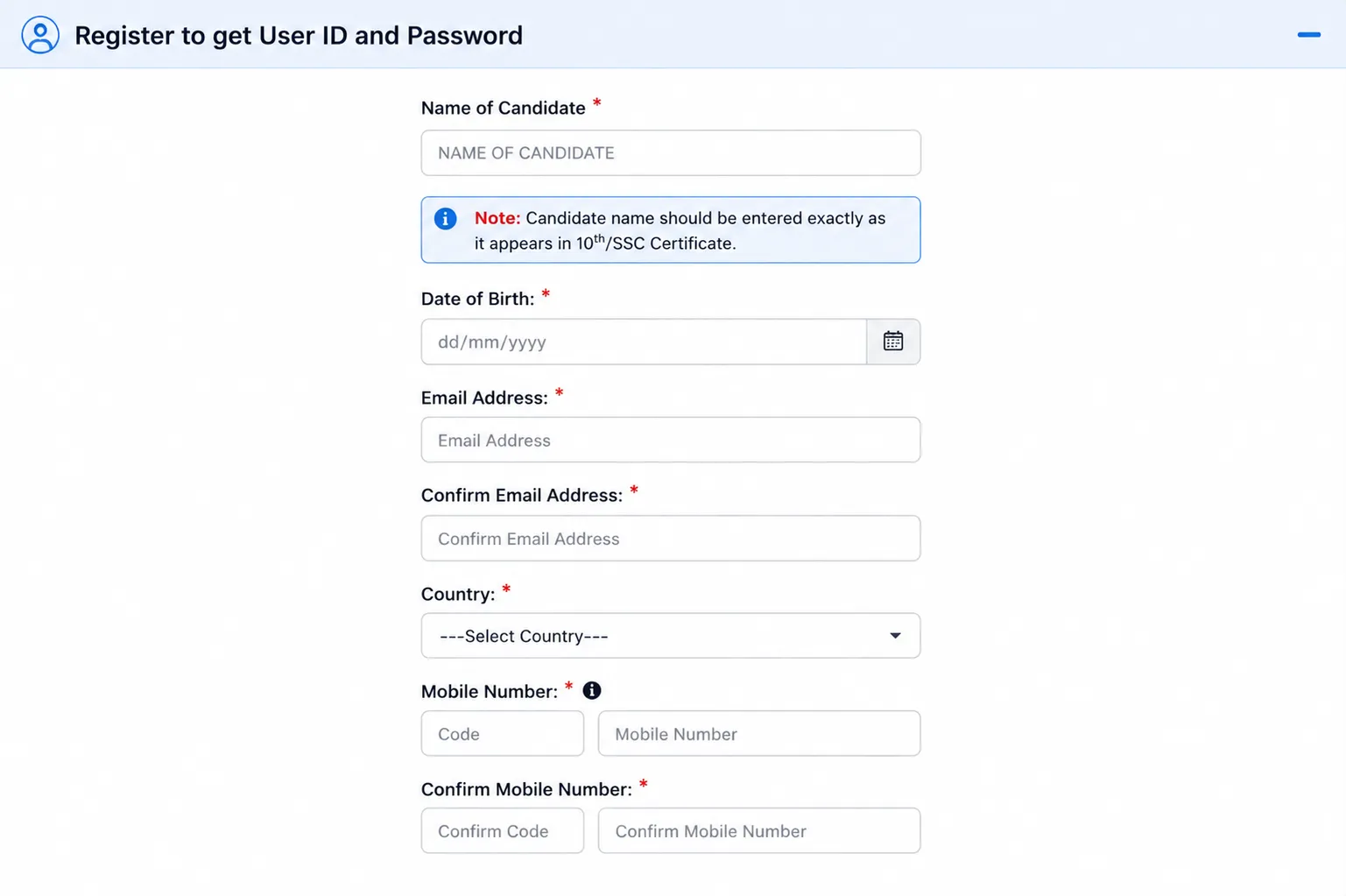
CAT registration page where candidates enter their basic information and generate an OTP for verification.
Step 2: IIM CAT Login and Begin Registration
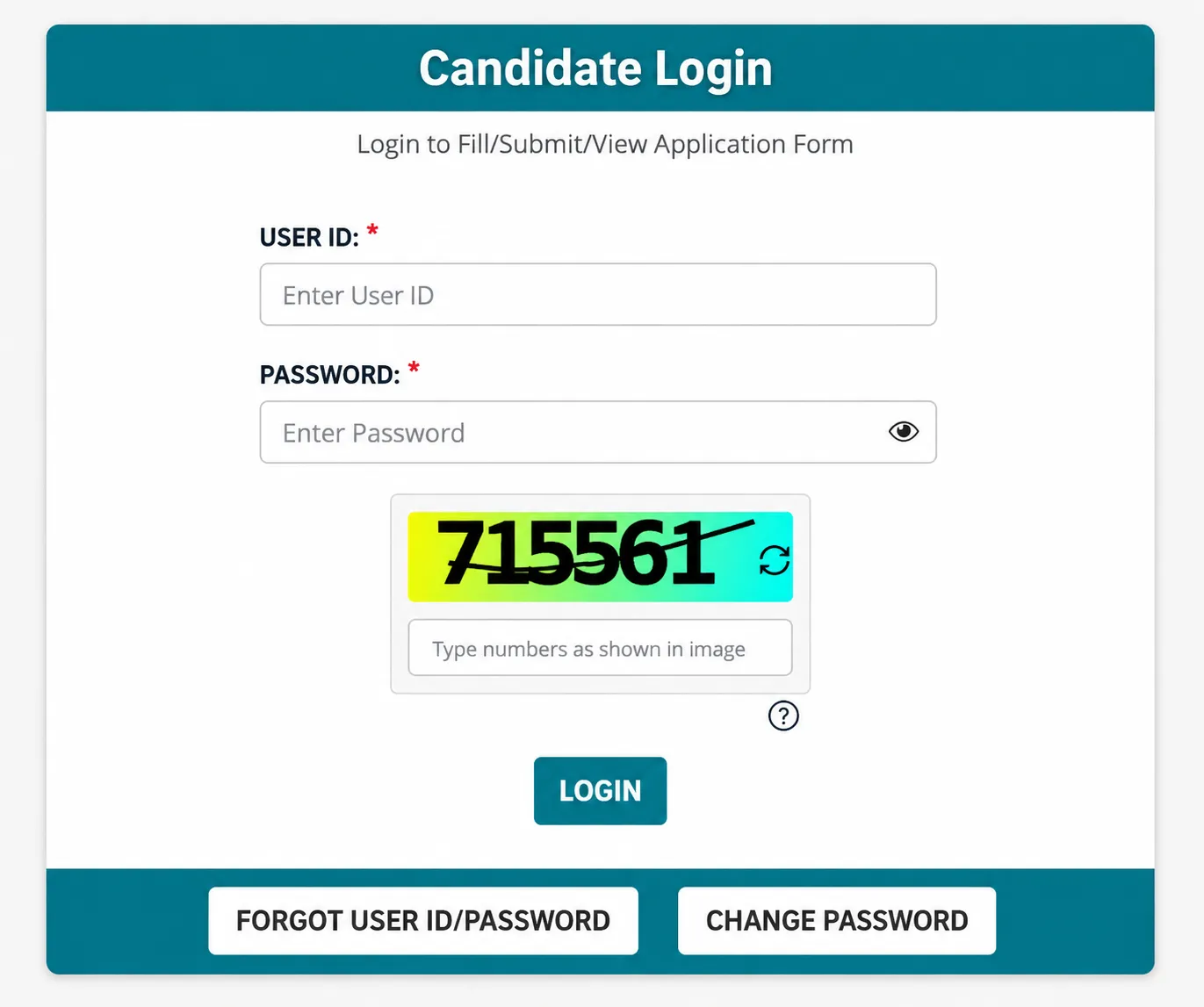
Candidate dashboard where registered applicants can log in and access the CAT application form.
Step 3: Enter Personal Details and Upload Documents in the CAT Application Form
In this section, candidates need to provide their personal, category, disability, and address details. The information required includes:
Note:
Upload Photograph and Signature
After entering the details and uploading all the required documents, click on Save & Next.
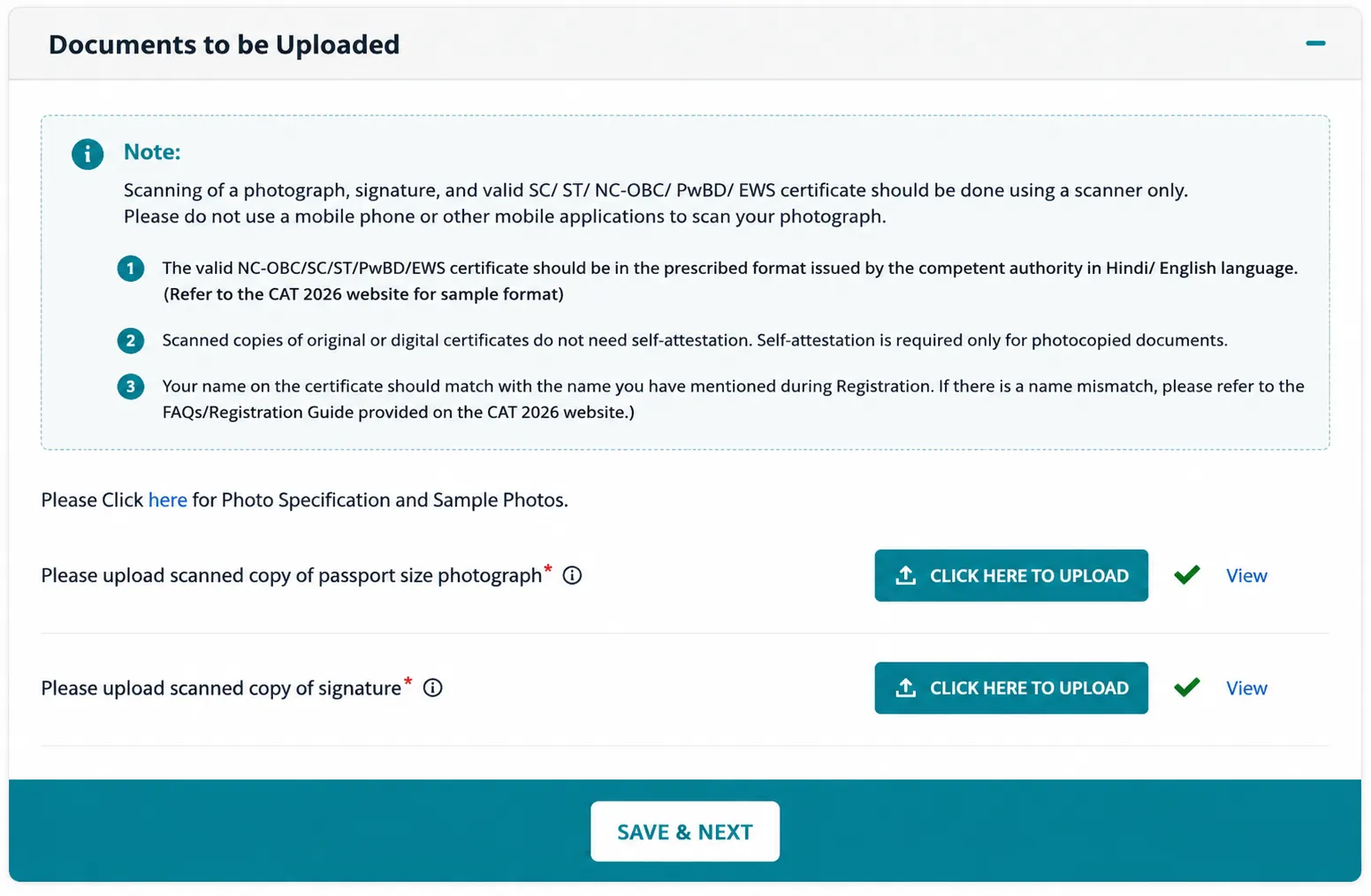
Personal details and document upload section where candidates enter their personal and address details and upload their photograph, signature, and applicable certificates.
Step 4: Enter Academic Details in CAT Registration 2026
Candidates need to enter their Class 10, Class 12/Diploma, Bachelor's degree, and other applicable academic details in the CAT 2026 application form.
Class 10 Details
Class 12 or Diploma Details
Bachelor’s Degree Details
After entering all the academic details, click on Save & Next.
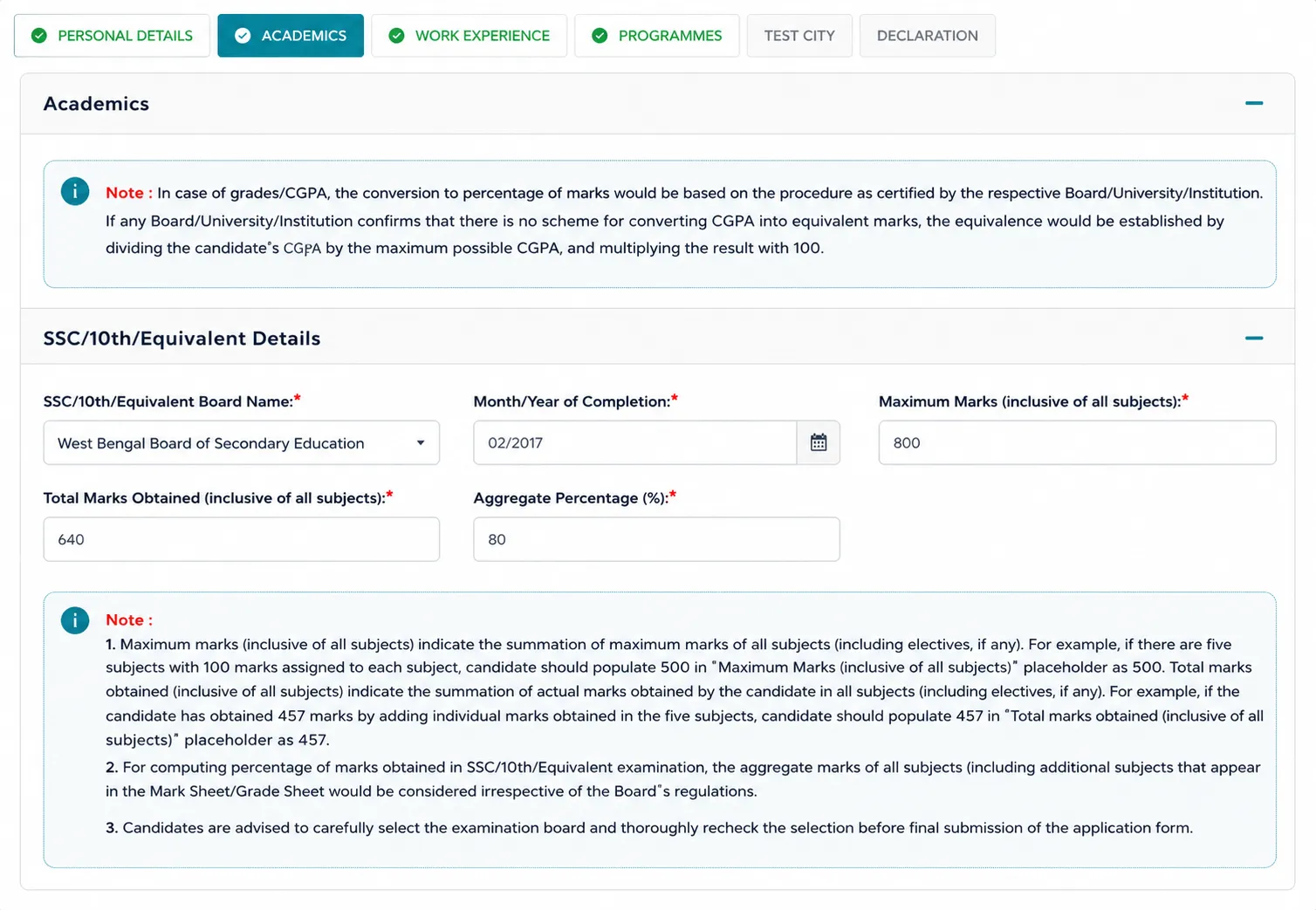
Academics section where candidates enter their marks, qualification details, and graduation details.
Step 5: Enter Work Experience
Candidates are required to state the number of days spent in working full-time after completing their education till 31st July, 2026.
Note: Working part-time, internship, articled, academic project and work experience gained prior to completion of studies are not eligible work experience.
Step 6: Select Programmes and Interview Cities
Candidates can choose the management programmes offered by the participating IIMs in the programme selection section.
Step 7: Select CAT Test Cities
Candidates are required to pick five test cities as per their preferences.
Note: Test City and Exam Slot will be allotted to candidates post completion of the registration process as per availability of the test centres. Details of the allotted test center and slot will be given in CAT admit card.
Step 8: Preview, Submit and Pay CAT Application Fee
Students are expected to make payment through a credit card, debit card, net banking, UPI, and wallet facility. After making the payment successfully, students are supposed to note the transaction number. Students will have to log in again and select the Download Application option to download the CAT application form.
Candidates planning to appear for CAT 2026 should check the eligibility requirements before filling out the application form. The eligibility criteria primarily comprise the education qualification and the minimum marks of the candidates. Below is a summary of the important CAT 2026 registration eligibility criteria:
| Eligibility Parameter | CAT 2026 Eligibility Criteria |
| Educational Qualification | Bachelor's degree from a recognised university or institution |
| Minimum Marks | 50% aggregate marks for General, EWS and NC-OBC candidates |
| Minimum Marks for Reserved Categories | 45% aggregate marks for SC, ST and PwD candidates |
| Final-Year Students | Eligible to apply provisionally |
| Professional Qualifications | Candidates with CA, CS or CMA qualifications can apply, subject to applicable criteria |
| Work Experience | Not mandatory for appearing in CAT 2026 |
| Age Limit | No specified age limit |
CAT 2026 application fee has to be paid at the time of submission of the form. The candidate can fill the form along with the registration procedure, but the application will not be treated as complete until the fee is paid successfully. The latest CAT 2026 application fee is given below:
| Category | CAT Application Fee 2026 |
|---|---|
| General, EWS and NC-OBC | INR 2,700 |
| SC, ST and PwD | INR 1,350 |
Candidates need to keep the required documents ready while filling out CAT 2026 application form. The photograph, signature, and applicable certificates must be uploaded in the prescribed format and size.
| Document | Details |
|---|---|
| Scanned Passport-Size Photograph | The photograph should be recent and not more than six months old. It should be 1200 × 1200 pixels and in .jpg or .jpeg format. The file size should not exceed 80 KB, with a resolution of at least 150 px/inch. |
| Scanned Signature | The signature should be 80 mm × 35 mm and in .jpg or .jpeg format. It should be clear and placed on a white background. The file size should not exceed 80 KB, with a resolution of at least 150 px/inch. |
| NC-OBC/SC/ST Certificate | Candidates belonging to the NC-OBC, SC, or ST category need to download the prescribed certificate from the CAT website, enter the required details, self-attest it, and upload the scanned copy in PDF format. |
| PwD Certificate | Candidates applying under the PwD category need to download the prescribed PwD certificate from the CAT website, fill in the required details, self-attest it, and upload the scanned copy in PDF format. |
| Final Year Certificate | Candidates currently in the final year of their Bachelor’s degree need to upload the Final Year Certificate issued by the Principal, HoD, Registrar, or Director. The certificate should confirm that the candidate has obtained at least 50% marks (45% for SC/ST/PwD candidates) or equivalent based on the latest available marks/grades. The prescribed format can be downloaded from the IIM CAT website. |
While applying for CAT 2026, one needs to make the choice of five preferred test cities from the list of provided options. But the actual test city will depend on the availability of seats in the test centers. The allotment of CAT test city and test center will be mentioned in the CAT admit card. The candidates might have the chance to change their preferred test city during CAT form correction period as prescribed by the exam conducting body.
While applying for the CAT 2026 examination through the application form, candidates should take into consideration the following points:
CAT Application Process: Errors to Avoid
CAT application process permits edits only to certain fields in the correction period. Hence, students are advised to complete the form with care from the beginning itself.
CAT 2026 form correction window will only let candidates correct themselves in the mentioned columns. They may upload an improved picture of the photograph and signature and change the preference of test city. The steps of CAT 2026 form correction are:
© 2026 Nuvora Education Private Limited. All rights reserved.
